
▦
Projects with a clear brief
Assign responsibilities and see what is done and what still needs completing.
- Tasks, assignees and deadlines
- Custom statuses, priorities and checklists
- Comments and change history
Waiting4In progress7Done18
Manage projects and tasks, track time and invoice your work in one application. See what is in progress, how much work is done and what is ready to invoice.
Your brief, team and progress in one place.
From the first brief to the invoice. Every record has its place and you know its status.
Click each step to explore the example. Approval can be configured for each project.
A brief belongs to a task. Time belongs to the work done. A price belongs to an agreed rate. Taskeo connects them.
Assign responsibilities and see what is done and what still needs completing.
Record work as you go or afterwards. Managers have the information they need to review it right in the project.
Compare planned and completed work. Colours highlight when time or cost limits are approaching.
Write procedures and notes in the project wiki. Attach files to a project or task and keep their versions.
Keep work awaiting approval, ready to invoice and already invoiced clearly separated.
See how tasks, completed work and invoicing connect. Each step has its place.
Tasks, people and files come together in one project. The team knows what to do and by when.
Explore the interface and workflows from project brief to invoicing.
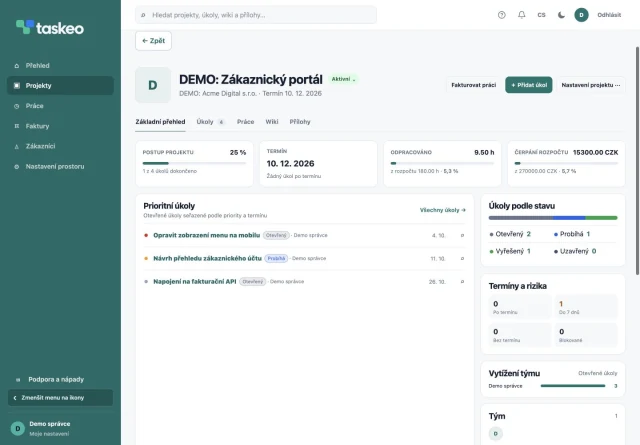
Briefs, assignees, deadlines and budget in one place.
Explore projects →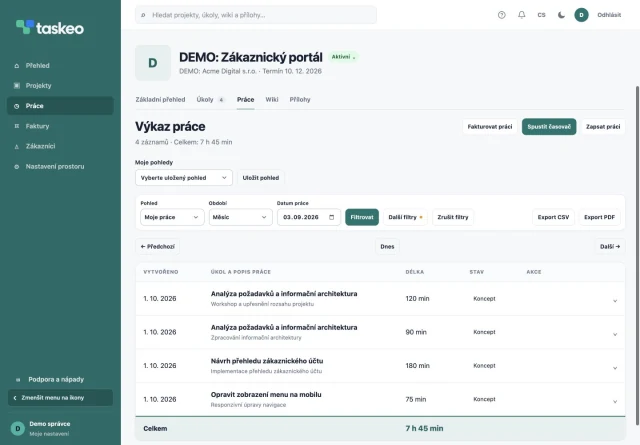
Timer, work records and an overview of completed work.
Explore time tracking →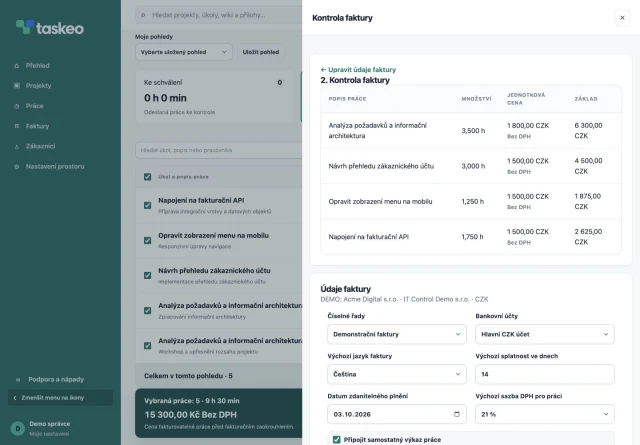
Selected work, rates and item review before creating an invoice.
Explore invoicing →The actual Taskeo interface with sample data (shown in Czech).
For independent professionals and teams delivering services to customers. And for internal projects that do not need invoicing.
Customers, tasks, time and invoices in one workspace.
An overview of multiple projects, team work and invoicing details.
Clear briefs, hours worked and customer-specific rates.
Responsibilities, deadlines, documentation and work records without needing to invoice.
Projects, tasks, work records, wiki, attachments and invoicing form the foundation.
For individuals who want projects and invoicing together.
Assign work, review timesheets and deliver projects together.
Let us agree on scope and terms for your operation.
14 days to try Taskeo. All prices exclude VAT. Annual subscriptions are paid for the full year in advance.
From assigning work to handing invoices to your accountant.
Yes. SOLO is designed for one user and one invoice issuer. You can manage multiple customers, projects and tasks.
Approval can be configured per project. It helps a team distinguish work awaiting review from work ready to invoice. A manager can approve records or return them with a reason.
Yes. Choose specific work records or work on selected tasks. Check items and amounts before creating an invoice draft. Work included in an invoice remains marked.
Yes. Rates can vary by work type, customer, project or team member. Taskeo distinguishes sales rates from internal costs.
Yes. Besides using a timer, you can enter work manually with its date, duration, type and description. You can assign the record to a specific task.
Access depends on permissions and project membership. Assign responsibilities and decide who can access each project.
You can export Taskeo invoices in ISDOC format and import them into accounting software that supports it. Check import availability and the supported ISDOC version with your software provider or accountant. This is a file transfer, not automatic synchronisation.
Yes. Prices and rates can include or exclude VAT. Review the net amount, VAT and total when preparing an invoice.
Download invoices as PDF or export them to ISDOC for further processing. Invoices also support QR payments.
The project overview shows hours worked and spending against the financial budget. Indicators change colour as limits approach, are reached or exceeded.
Yes. Use tasks, work records, wiki and attachments without issuing invoices. Track deadlines, responsibilities and completed work on internal projects.
Use Taskeo in a web browser on your computer or phone. Sign in to your workspace at app.taskeo.cz. The interface offers Czech, English, and light or dark themes.
Tell us about your projects and needs. We will get in touch to discuss how to set up Taskeo for you.